Add an article section menu
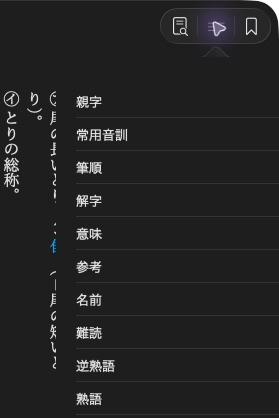
旺文社漢字典「鳥」. The app presents these links through its menu button.
entry-index supplies the app's section menu even when it is hidden in the
article. Its links point to allocated section targets.
<entry-index>
    <a href="08721-C001">親字</a>
    <a href="08721-C005">意味</a>
</entry-index>
entry-index { display: none; }
Use the target handles from your writer instead of copying the example's IDs.
Use allocated targets
Allocate the sections before writing the article. Put their IDs on the matching article elements and use the same targets in the menu links:
meaning = article.add_target(mkd.EntryTargetKind.SECTION)
link = mkd.InlineText()
link.append(mkd.EntryLink(meaning, "意味"))
menu_xml = "<entry-index>" + link.to_xml() + "</entry-index>"
meaning_xml = f'<div id="{meaning}"><p>鳥の羽。</p></div>'
auto meaning = article.addTarget(MKD::EntryTargetKind::Section).value();
MKD::InlineText link;
link.append(MKD::EntryLink{meaning, "意味"});
auto menuXml = "<entry-index>" + link.toXhtml().value() + "</entry-index>";
auto meaningXml = std::format(
    R"(<div id="{}"><p>鳥の羽。</p></div>)", meaning.toString());
Insert both fragments into the article XML before writing it. Keep
entry-index { display: none; } in the stylesheet. The native app reads the
links even though the menu element is hidden in the article body.
Next: Add ruby.