Build kanwa indexes
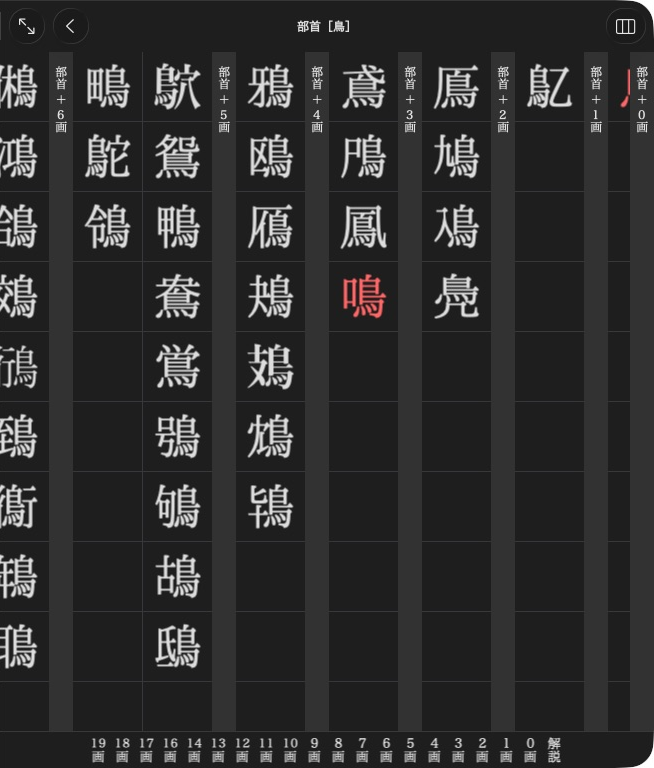
KJT groups 鳥 entries by the number of strokes outside the radical.
Start with the kanwa product in Subentries and links. Create tori and naku entries and give them headlines before adding this index.
Group entries under a radical
members = mkd.NavigationIndex(sections=[
    mkd.NavigationSection("部首 + 0画", [mkd.NavigationItem(target=tori.target)]),
    mkd.NavigationSection("部首 + 3画", [mkd.NavigationItem(target=naku.target)]),
], section_index=False)
radicals = mkd.NavigationIndex(
    kind=mkd.NavigationKind.RADICALS,
    sections=[mkd.NavigationSection("11画", [mkd.NavigationItem(
        label=mkd.RadicalLabel("鳥", reading="とり・とりへん"),
        target=members,
    )])],
)
product.set_navigation(mkd.NavigationIndex(sections=[
    mkd.NavigationSection("親字", [mkd.NavigationItem(label="部首", target=radicals)]),
]))
MKD::NavigationIndex members{
    .sections = {
        {"部首 + 0画", {{.target = MKD::AppendixEntryLink{tori.target(), dictionaryId}}}},
        {"部首 + 3画", {{.target = MKD::AppendixEntryLink{naku.target(), dictionaryId}}}},
    },
    .sectionIndex = false,
};
MKD::NavigationIndex radicals{
    .kind = MKD::NavigationKind::Radicals,
    .sections = {{"11画", {{
        .label = MKD::RadicalLabel{.character = "鳥", .reading = "とり・とりへん"},
        .target = std::move(members),
    }}}},
};
product.setNavigation({.sections = {{"親字", {{"部首", std::move(radicals)}}}}}).value();
This kanwa example opens 部首 → 鳥 → entries grouped by additional strokes.
RadicalLabel arranges the character, optional variants and reading in the native
cell. It is only available in the kanwa profile.
Kanwa kind selects native presentation:
| Kind | Author supplies |
|---|---|
GENERIC |
Any named groups or entry lists |
RADICALS |
Radical stroke groups, radicals, then additional-stroke entry groups |
READINGS |
Reading groups and matching entries |
TOTAL_STROKES |
Numeric labels such as "11", then matching entries. The app adds 画 |
CLASSIFICATIONS, NAMES |
Named categories and their entries |
Kanwa sections show their titles above entry groups. compact=True uses smaller
cells. section_index=False hides the jump strip, which can truncate long section
titles. For items without explicit labels, parent_headlines=True displays main-entry headlines while preserving
subentry destinations.
AppendixDocument and AppendixList targets can also appear in navigation.
Cross-dictionary article targets use AppendixEntryLink(target, dictionary_id).
Native files, offsets and controller classes are generated internally. Specialised
product controllers are outside the authoring profiles.
Next: Add appendices.