Add search keys
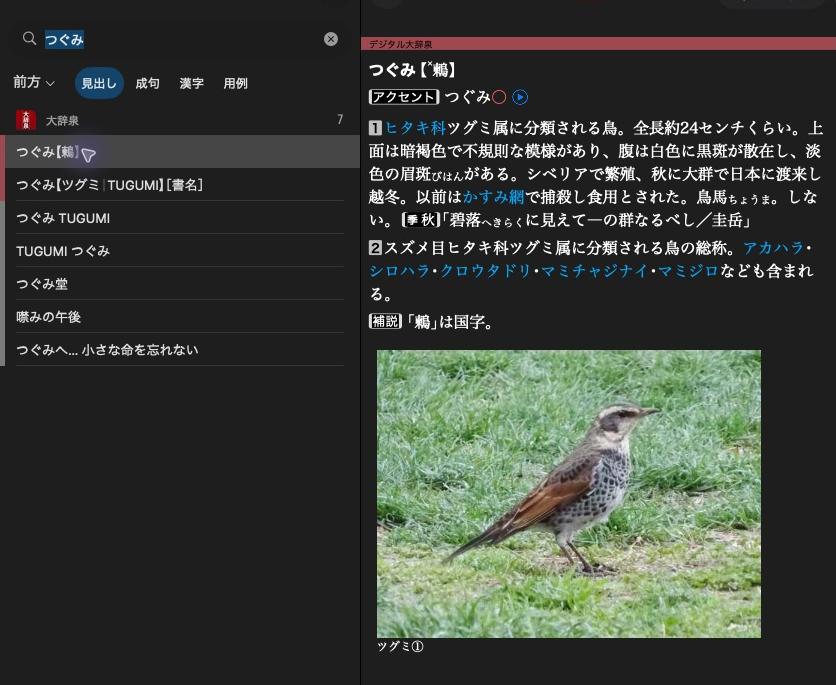
大辞泉 shows a headline in the result list and the selected article beside it.
Spelling 鶫 and reading つぐみ can both lead to one article. Use an allocated target with a headline.
Add spelling and reading keys
dictionary.add_search_key(mkd.SearchScope.HEADWORD, "鶫", target)
dictionary.add_search_key(mkd.SearchScope.HEADWORD, "つぐみ", target)
dictionary.addSearchKey(MKD::SearchScope::Headword, "鶫", target).value();
dictionary.addSearchKey(MKD::SearchScope::Headword, "つぐみ", target).value();
Search keys use UTF-8. Both keys point to the same article. Neither the headline
nor sortingHeadline automatically adds search keys. The writer normalises
these keys using its supported default native profile.
Restrict a key to exact matching
dictionary.add_search_key(mkd.SearchScope.HEADWORD, "とり", target, exact_only=True)
dictionary.addSearchKey(MKD::SearchScope::Headword, "とり", target, {.exactOnly = true}).value();
This key participates in exact lookups and is excluded from prefix and suffix matching.
Select the scope
Use HEADWORD for ordinary entry spellings and readings. For independently
searchable idioms, compounds, meanings or examples, allocate a subentry
target and add keys to its corresponding scope.
The scope and profile reference lists all supported choices. Keys must be supplied explicitly, including full-text keys. The writer does not extract them from article XML.
Next: Add subentries and links.