Styling articles
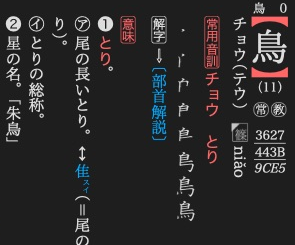
KJT lays out the 鳥 article vertically, keeping its stroke count upright.
Add a stylesheet to control your article XML. Dictionaries renders articles with its own layout engine. A browser preview will not reproduce all of these features. For lookup, see the CSS reference and mathematical notation, with rendered results.
Add the stylesheet
dictionary.add_asset("dictionary.css", mkd.Buffer.map("dictionary.css"))
dictionary.add_asset("dictionary-nightmode.css", mkd.Buffer.map("dictionary-nightmode.css"))
auto css = MKD::RetainedSpan::map("dictionary.css").value();
dictionary.addAsset("dictionary.css", css.span()).value();
auto night = MKD::RetainedSpan::map("dictionary-nightmode.css").value();
dictionary.addAsset("dictionary-nightmode.css", night.span()).value();
Reference it from the article’s <head>:
<link rel="stylesheet" href="dictionary.css"/>
The reader recognises the -nightmode.css sibling. Local CSS resource references
are checked when the dictionary finishes.
Start with the article layout
body {
    margin: 1em;
    font-size: 1.2em;
    line-height: 1.5em;
}

meaning { display: block; }
Custom XML elements start inline. Give sections display: block when they should
start a new paragraph. Use em for spacing that follows the reader's text size.
Vertical writing and horizontal groups
旺文社漢字典「鳥」. The stroke count stays together within the vertical layout.
<body>
    <p>鳥は<Tc>11</Tc>画。</p>
</body>
body { writing-mode: vertical-rl; }
Tc { text-combine-horizontal: all; }
vertical-rl lays out columns from right to left. text-combine-horizontal
keeps a short group upright within the column, as in 縦中横. Use none when the
text should follow the normal vertical flow.
Colours and night presentation
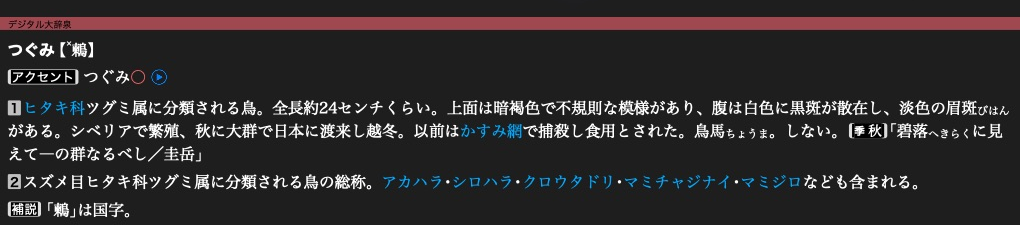
大辞泉「鶫」 in night presentation. Its named header, accent and link colours
Define a colour name once, then use it in text, backgrounds and borders:
/* Birds.css */
@color okg-red = #E4007F;
M_hang { color: okg-red; }
Override that name in the sibling night stylesheet:
/* Birds-nightmode.css */
@color okg-red = #FF80B0;
The layout engine adds the night stylesheet when night presentation is active. It also has
its own night palette for names such as black and blue.
Notes
- The layout engine skips
@mediablocks. - Register fonts through the writer and select their internal font name with
font-family. Article@font-facerules are not processed. ruby-positionis not processed. Use ruby markup and the display rules above.- Browser layout features such as flexbox, grid and CSS variables are not supported by this article parser. Start with blocks, inline text and tables.
- Check long text and both writing directions in the app. Small gaiji, compact readings and fixed-size labels need enough space at the reader's chosen size.
Use the native CSS table to find a property, or layout examples for warichu, math, hanging markers and other native features. Ruby and gaiji have their own authoring guides.
Next: Build category navigation.