Create your first dictionary
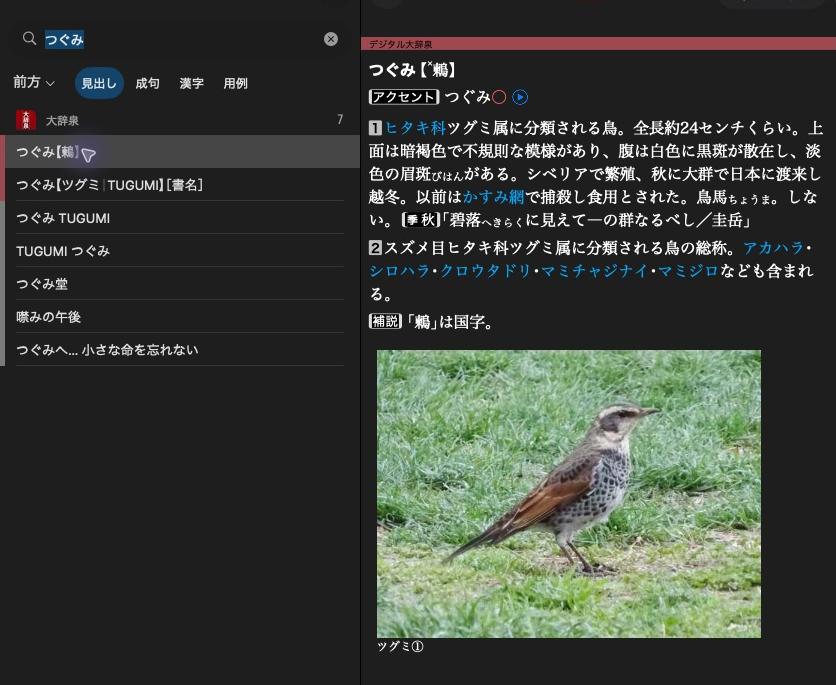
大辞泉 shows a headline in the result list and the selected article beside it.
Build a small dictionary with one article about 鶫(つぐみ). The screenshot
shows the official 大辞泉 article. Our example uses simpler original XML.
Start with a new directory such as Birds for destination.
Python snippets assume import mkd. C++ snippets use .value() to keep the API
visible. See error handling for application code.
Create the product and its dictionary
product = mkd.ProductWriter.create(
    destination,
    mkd.DictionaryMetadata(
        display_name=mkd.LocalizedString(en="Birds", ja="鳥の辞典"),
        version="1.0",
    ),
)

dictionary = product.add_dictionary(mkd.DictionaryContent(
    identifier="example.birds.ja",
    directory="ja",
    dictionary_id=1000,
    title=mkd.LocalizedString(ja="鳥の辞典"),
    languages=["ja"],
))
The dictionary writer retains its product writer automatically.
auto product = MKD::ProductWriter::create(destination, {
    .displayName = MKD::LocalizedString{.en = "Birds", .ja = "鳥の辞典"},
    .version = "1.0",
}).value();

auto dictionary = product.addDictionary({
    .identifier = "example.birds.ja",
    .directory = "ja",
    .dictionaryId = 1000,
    .title = MKD::LocalizedString{.ja = "鳥の辞典"},
    .languages = std::vector<std::string>{"ja"},
}).value();
Keep product alive while using its dictionary writer.
destination is a new product directory, for example /path/to/Birds. The writer
refuses an existing destination. This creates one dictionary under Contents/ja.
| Value | Purpose |
|---|---|
Birds in the destination path |
Determines the product identifier jp.monokakido.Dictionaries.Birds. |
displayName |
Human-readable product name. |
identifier |
Stable textual identity for this dictionary's content. |
directory |
Content directory name inside Contents/. |
dictionaryId |
Nonzero 16-bit native dictionary ID. |
Content identifiers, directory names, and numeric dictionary IDs must be unique
within the product. Choose numeric IDs that do not collide with products you
intend to use together. 1000 is an example, not a reserved custom ID.
Add an article
article_xml = """<html xmlns="http://www.w3.org/1999/xhtml" hmhtml="5" lang="ja">
<head><title>鶫</title></head>
<body><h1>鶫(つぐみ)</h1><p>冬に日本で見られる鳥。</p></body>
</html>"""

entry = dictionary.create_entry()
target = entry.target
entry.write_xml(article_xml)
constexpr std::string_view articleXml = R"(<html xmlns="http://www.w3.org/1999/xhtml" hmhtml="5" lang="ja">
<head><title>鶫</title></head>
<body><h1>鶫(つぐみ)</h1><p>冬に日本で見られる鳥。</p></body>
</html>)";

auto entry = dictionary.createEntry().value();
const auto target = entry.target();
entry.writeXml(articleXml).value();
Supply a complete UTF-8 XML document using the native article markup shown above.
The namespace is part of that markup. createEntry() / create_entry() allocates
a page ID. target refers to the whole article.
Give the article a headline
dictionary.add_headline(mkd.HeadlineComponents(
    headline="鶫",
    sorting_headline="つぐみ",
    entry_id=target,
))
Headline fields accept Python strings and convert them automatically.
dictionary.addHeadline({
    .headline = u"鶫",
    .sortingHeadline = u"つぐみ",
    .entryId = target,
}).value();
Headline fields use UTF-16.
Every page needs a primary headline. sortingHeadline / sorting_headline
controls headline ordering. Neither field comes from the XML heading.
Add spelling and reading keys
dictionary.add_search_key(mkd.SearchScope.HEADWORD, "鶫", target)
dictionary.add_search_key(mkd.SearchScope.HEADWORD, "つぐみ", target)
dictionary.addSearchKey(MKD::SearchScope::Headword, "鶫", target).value();
dictionary.addSearchKey(MKD::SearchScope::Headword, "つぐみ", target).value();
Search keys use UTF-8. Both keys point to the same article. Neither the headline
nor sortingHeadline automatically adds search keys. The writer normalises
these keys using its supported default native profile.
Add copyright information
product.set_information(mkd.ProductInformation(
    copyright=mkd.LocalizedString(ja="© 2026 鳥の辞典編集室"),
))
product.setInformation({
    .copyright = MKD::LocalizedString{.ja = "© 2026 鳥の辞典編集室"},
}).value();
The writer generates the product information page. You can add licenses and custom pages later.
Publish the files
dictionary.finish()
product.finish()
dictionary.finish().value();
product.finish().value();
Finish each dictionary before the product. product.finish() validates the
build and publishes its folder at destination. Abandoning a writer does not
publish anything. See finishing and validation for details.
Try the dictionary
Install the finished product in Dictionaries
on macOS, then search for つぐみ or 鶫. You can also open and search it with
the library.
The birb example project shows a larger general dictionary, a kanwa dictionary and a field guide.