Define headlines
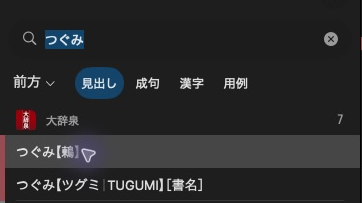
大辞泉 displays つぐみ【鶫】 in the result list.
The result-list headline and its ordering text are separate from the article’s XML heading. Use an allocated target.
Give the article a headline
dictionary.add_headline(mkd.HeadlineComponents(
    headline="鶫",
    sorting_headline="つぐみ",
    entry_id=target,
))
Headline fields accept Python strings and convert them automatically.
dictionary.addHeadline({
    .headline = u"鶫",
    .sortingHeadline = u"つぐみ",
    .entryId = target,
}).value();
Headline fields use UTF-16.
Every page needs a primary headline. sortingHeadline / sorting_headline
controls headline ordering. Neither field comes from the XML heading.
Add an alternative headline
dictionary.add_headline(
    mkd.HeadlineComponents("つぐみ", target), role=mkd.HeadlineRole.SHORT,
)
dictionary.addHeadline({.headline = u"つぐみ", .entryId = target}, MKD::HeadlineRole::Short).value();
Primary, secondary and short headlines are stored separately for native consumers
to select. An alternative label does not replace the required primary headline or
add a search key. Use HeadlineRole::Secondary / HeadlineRole.SECONDARY for the
secondary store.
Primary headlines are also used by entry lists and navigation items without explicit labels. Prefix and suffix fields add text around the main headline. They do not add searchable spellings. Use search keys for that.
Next: Add search keys.