Add gaiji
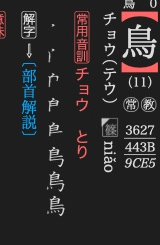
旺文社漢字典 places a small character image beside the reading in its 鳥 article.
Use a character image when Unicode text and the chosen font cannot supply the required form.
Register and encode the glyph
Use gaiji for a glyph that needs a supplied image. Ordinary Unicode text needs
no registration. rare.svg below is your own glyph artwork.
label = mkd.InlineText()
image = mkd.Buffer.map("rare.svg")
glyph = dictionary.add_gaiji("rare.svg", image)
label.append(mkd.Gaiji(glyph, replacement="鶫"))
MKD::InlineText label;
auto image = MKD::RetainedSpan::map("rare.svg").value();
auto glyph = dictionary.addGaiji("rare.svg", image.span()).value();
label.append(MKD::Gaiji{glyph, "鶫"});
Registration writes PNG or SVG bytes under gaiji/ and returns a reusable
content-relative reference. Replacement text is used by plainText(). The default rendering
styles the image as text. Choose GaijiRendering::Original /
GaijiRendering.ORIGINAL to preserve the original image presentation.
glyph_xml = label.to_xml()
auto glyphXml = label.toXhtml().value();
Insert the fragment into the article XML before calling write_xml() /
writeXml(). It refers to the registered gaiji/ asset. See image
styling for size and colour behaviour.
Next: Add images and audio.