Native layout examples
Short XML and CSS examples for the native CSS reference. Add these rules to an article stylesheet.
Compact readings with warichu
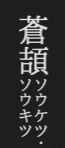
旺文社漢字典「鳥跡・鳥迹」, within「鳥」. Both readings fill the two small columns.
蒼頡<mlg>ソウケツ・ ソウキツ</mlg>
mlg {
    display: warichu;
    font-size: 0.5em;
}
Warichu divides a short annotation into two compact lines. It is useful for readings and parenthetical notes. It is separate from ruby, which attaches a reading to base text.
Images that behave like text
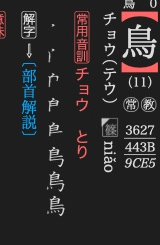
旺文社漢字典「鳥」. The small image beside niǎo is an inline gaiji.
<img class="字韻" src="img/字韻047.png"/>
img.字韻 {
    display: gaiji;
    height: 1.1em;
    text-combine-horizontal: all;
}
display: gaiji gives an image text-like placement. Set its height in em to
follow the surrounding font size. Monochrome gaiji can follow the text colour,
including night-mode colours. Keep ordinary illustrations as ordinary images.
For your own glyphs, use gaiji registration.
Mathematical expressions
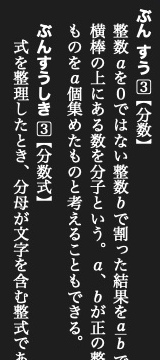
大辞林「分数」. Both fractions remain upright within the vertical text.
<math>\frac{a}{b}</math>
math {
    display: math;
    text-combine-horizontal: all;
}
The layout engine passes the formula text to its mathematical renderer. This example draws a fraction. The input is formula notation, rather than a MathML element tree.
Hanging markers
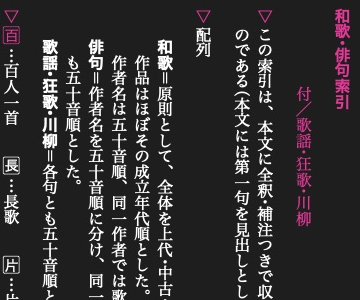
旺文社古語辞典「和歌・俳句索引」. The ▽ markers sit outside the text columns.
<p><M_hang>▽</M_hang>鳥の読みから項目を探します。</p>
M_hang {
    display: hang;
    margin-right: 0.2em;
    color: okg-red;
}
display: hang puts a marker outside the paragraph's text edge. Wrapped lines
align with the text rather than the marker. Here okg-red is a named colour,
defined in the stylesheet.
Arrow-shaped labels
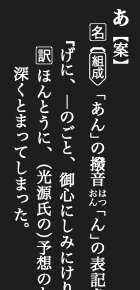
旺文社古語辞典「あ【案】」.
<M_mark class="組成">組成</M_mark>
M_mark.組成 {
    border: solid 1px black;
    border-shape: arrow-box;
    padding-right: 0.5em;
}
border-shape: arrow-box turns the label's border into an arrow-shaped outline.
Use arrow-box-rl for the opposite arrow direction.
Pitch-accent marks
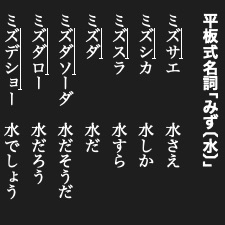
大辞林「文節・活用形のアクセント例」. The line marks ズサ in ミズサエ.
ミ<sl>ズサ</sl>エ
sl { text-decoration: accent; }
text-decoration: accent draws a line along the high-pitch part, with a short
stroke marking the drop at its end. The line follows the writing direction.
Font glyphs and features
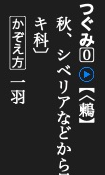
新明解国語辞典「鶫」. The boxed zero is selected by glyph.
Select a glyph
<accent0>⓪</accent0>
accent0 { glyph: 11307; }
glyph selects a glyph number in the current font. 新明解 uses this for its
accent symbols. The number is font-specific, not a Unicode code point. Prefer
ordinary Unicode or gaiji unless you control the font.
Select a font feature
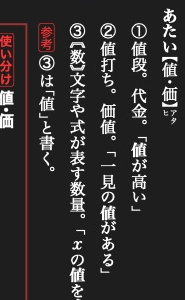
旺文社国語辞典「値・価」. The variable x uses the font's italic form.
「<ital>x</ital>の値を求める」
ital { glyph-form: ital; }
glyph-form selects an OpenType feature by its four-character tag. The font
must provide that feature. Installed dictionaries also use jp90 for Japanese
character forms.
Ruby presentation
Ruby markup comes from Add ruby. Style its reading with the native display rules:
rt {
    display: ruby-text;
    font-size: 0.55em;
}
To hide optional readings in the normal stylesheet, use rt { display: none; }.
A full-ruby stylesheet can
restore display: ruby-text when the reader enables that presentation. It styles
readings already in the XML, it does not generate them.