Subentries and links
An article can contain independently searchable compounds, idioms and examples. In 旺文社漢字典, a 熟語 search for ”ちょうご” opens 鳥語 within the 鳥 article:
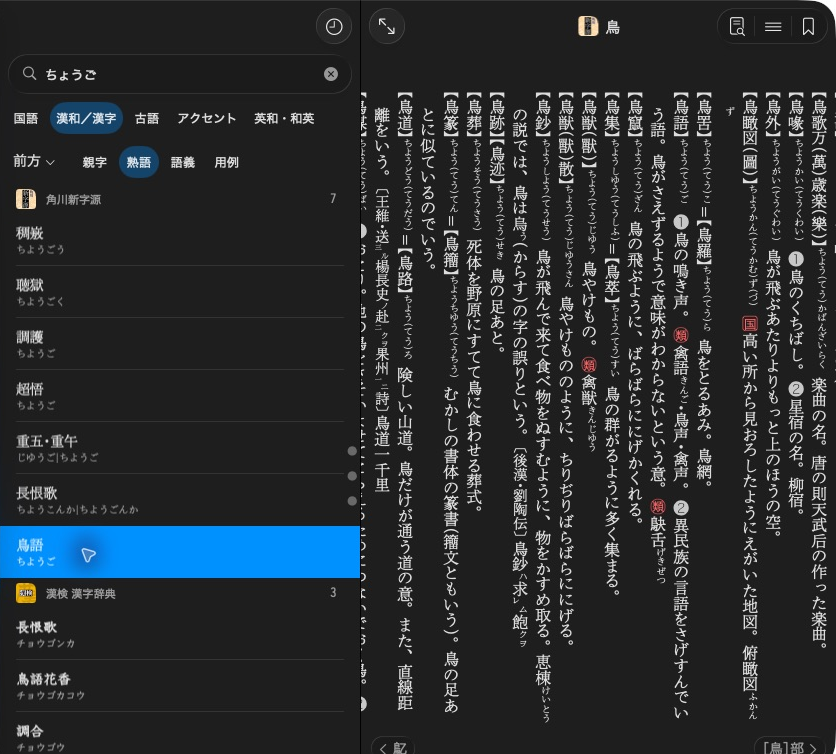
The selected compound has its own headline and target. Its XML remains part of the 鳥 page. This shortened native excerpt shows the target on its container:
<SubItem id="08721-8006">
  <SubItemC>
    <SubItemHeadG>
      <headword class="熟語">…鳥語…</headword>
      <yomi>チョウ(テウ) ゴ</yomi>
    </SubItemHeadG>
    …
  </SubItemC>
</SubItem>
SubItem is KJT's markup. The example below uses a simpler structure and lets
the writer allocate the IDs.
Start a kanwa product
Create a separate product using the kanwa profile. The steps follow the same
pattern as the first dictionary, now with a compound inside the article. Use a
new directory for destination.
product = mkd.ProductWriter.create(
    destination,
    mkd.DictionaryMetadata(
        display_name=mkd.LocalizedString(ja="鳥の漢字辞典"),
        version="1.0",
    ),
    profile=mkd.CreationProfile.KANWA,
)

dictionary = product.add_dictionary(mkd.DictionaryContent(
    identifier="example.birds.kanwa",
    directory="kanwa",
    dictionary_id=1001,
    title=mkd.LocalizedString(ja="鳥の漢字辞典"),
    languages=["ja"],
))
auto product = MKD::ProductWriter::create(destination, {
    .displayName = MKD::LocalizedString{.ja = "鳥の漢字辞典"},
    .version = "1.0",
}, MKD::CreationProfile::Kanwa).value();

auto dictionary = product.addDictionary({
    .identifier = "example.birds.kanwa",
    .directory = "kanwa",
    .dictionaryId = 1001,
    .title = MKD::LocalizedString{.ja = "鳥の漢字辞典"},
    .languages = std::vector<std::string>{"ja"},
}).value();
Allocate the article and compound
article = dictionary.create_entry()
target = article.target
compound = article.add_target(mkd.EntryTargetKind.COMPOUND)
auto article = dictionary.createEntry().value();
const auto target = article.target();
const auto compound = article.addTarget(MKD::EntryTargetKind::Compound).value();
target opens the whole 鳥 article. compound opens 鳥語 inside it.
Allocate targets before writing the XML, then reuse them in headlines, keys and
links. You do not choose numeric IDs or ranges.
Add headlines and keys
Kanwa parent entries use Headword. Their jukugo use Idiom, the same search
scope used for phrases in general dictionaries.
dictionary.add_headline(mkd.HeadlineComponents(
    "鳥", target, sorting_headline="とり",
))
dictionary.add_search_key(mkd.SearchScope.HEADWORD, "とり", target)
dictionary.add_search_key(mkd.SearchScope.HEADWORD, "鳥", target)

dictionary.add_headline(mkd.HeadlineComponents(
    "鳥語", compound, sorting_headline="ちょうご",
))
dictionary.add_search_key(mkd.SearchScope.IDIOM, "ちょうご", compound)
dictionary.addHeadline({
    .headline = u"鳥", .sortingHeadline = u"とり", .entryId = target,
}).value();
dictionary.addSearchKey(MKD::SearchScope::Headword, "とり", target).value();
dictionary.addSearchKey(MKD::SearchScope::Headword, "鳥", target).value();

dictionary.addHeadline({
    .headline = u"鳥語", .sortingHeadline = u"ちょうご", .entryId = compound,
}).value();
dictionary.addSearchKey(MKD::SearchScope::Idiom, "ちょうご", compound).value();
Write the XML
Use the compound target as the container's id. Formatting it produces the
native ID spelling, such as 00001-8001.
article.write_xml(f"""<html xmlns="http://www.w3.org/1999/xhtml" hmhtml="5">
  <head><title>鳥</title></head>
  <body>
    <headword>鳥</headword>
    <p>とり。</p>
    <div id="{compound}">
      <headword>鳥語</headword>
      <p>鳥の鳴き声。</p>
    </div>
  </body>
</html>""")
article.writeXml(std::format(R"(<html xmlns="http://www.w3.org/1999/xhtml" hmhtml="5">
  <head><title>鳥</title></head>
  <body>
    <headword>鳥</headword>
    <p>とり。</p>
    <div id="{}">
      <headword>鳥語</headword>
      <p>鳥の鳴き声。</p>
    </div>
  </body>
</html>)", compound.toString())).value();
Every allocated passage target must appear in the XML. Writing consumes the XML and closes target allocation for that article. Finish the dictionary and product as in the first dictionary.
Reading a compound result still retrieves the whole article XML. Keep the full result target to locate its subsection.
Choose other target kinds
The target kind describes a location. The search scope describes the index used to find it. Allocating a target does not add keys or XML for you.
| Target kind | Use it for | Usual search scope |
|---|---|---|
Compound |
Kanwa jukugo | Idiom |
Idiom |
General-dictionary idioms and phrases | Idiom |
Example |
Examples or quotations | Example |
Sense |
Individual meanings | Sense |
Section |
Other article sections | Usually reached through a link |
For example, before writing an article, allocate an example target and put it on the example's element:
example = article.add_target(mkd.EntryTargetKind.EXAMPLE)
example_xml = f'<p id="{example}">朝、鳥の声で目を覚ます。</p>'
const auto example = article.addTarget(MKD::EntryTargetKind::Example).value();
auto exampleXml = std::format(
    R"(<p id="{}">朝、鳥の声で目を覚ます。</p>)", example.toString());
Insert that fragment into the article XML. Add a headline and Example search
keys if the example should appear in search results.
Link to a target
InlineText builds escaped text and native links. Use an existing target, such as
the compound above:
link = mkd.InlineText()
link.append(mkd.EntryLink(compound, "鳥語"))
link_xml = link.to_xml()
MKD::InlineText link;
link.append(MKD::EntryLink{compound, "鳥語"});
auto linkXml = link.toXhtml().value();
Insert the fragment into another article before writing it. Reserve entries and targets first when linking to articles you have not written yet. Links are checked when the dictionary is finished.