Product information and licenses
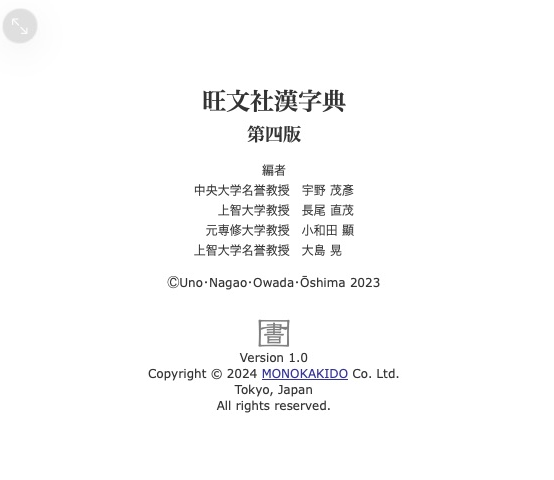
旺文社漢字典 presents its title, edition, editors and copyright through その他 → 著作権.
Choose the metadata when starting your build. The setup below replaces the product setup in the first dictionary. Add copyright and licenses before finishing. The library generates their pages and menu.
Set the product and content metadata
Pass product fields when creating the product. Pass publisher and edition when adding its dictionary:
metadata = mkd.DictionaryMetadata(
    display_name=mkd.LocalizedString(ja="鳥の辞典"),
    product_title=mkd.LocalizedString(ja="鳥の辞典"),
    description=mkd.LocalizedString(ja="身近な鳥のことば。"),
    version="1.0",
)
content = mkd.DictionaryContent(
    identifier="example.birds.ja",
    directory="ja",
    dictionary_id=1000,
    title=mkd.LocalizedString(ja="鳥の辞典"),
    languages=["ja"],
    publisher=mkd.LocalizedString(ja="鳥の辞典編集室"),
    edition=mkd.LocalizedString(ja="初版"),
)
product = mkd.ProductWriter.create(destination, metadata)
dictionary = product.add_dictionary(content)
auto product = MKD::ProductWriter::create(destination, {
    .displayName = MKD::LocalizedString{.ja = "鳥の辞典"},
    .description = MKD::LocalizedString{.ja = "身近な鳥のことば。"},
    .productTitle = MKD::LocalizedString{.ja = "鳥の辞典"},
    .version = "1.0",
}).value();
auto dictionary = product.addDictionary({
    .identifier = "example.birds.ja", .directory = "ja", .dictionaryId = 1000,
    .title = MKD::LocalizedString{.ja = "鳥の辞典"},
    .publisher = MKD::LocalizedString{.ja = "鳥の辞典編集室"},
    .edition = MKD::LocalizedString{.ja = "初版"},
    .languages = std::vector<std::string>{"ja"},
}).value();
The generated page uses the product title, description, content titles,
publishers, editions and version. LocalizedString accepts Japanese, English or
both. display_name / displayName names the product in the collection.
Supply copyright and licenses
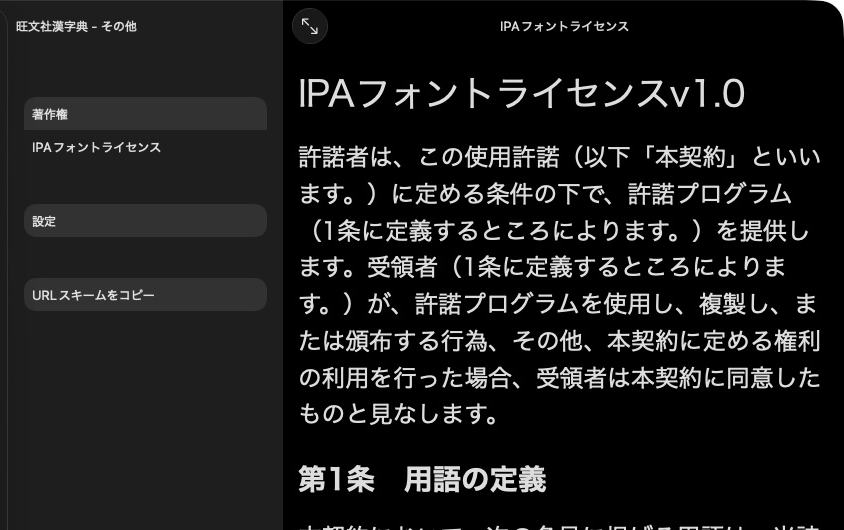
KJT lists its IPA font license separately from its copyright page.
Read your license text into license_text / licenseText, then register it:
product.set_information(mkd.ProductInformation(
    copyright=mkd.LocalizedString(ja="© 2026 鳥の辞典編集室"),
    licenses=[mkd.ProductLicense("Font license", license_text)],
))
product.setInformation({
    .copyright = MKD::LocalizedString{.ja = "© 2026 鳥の辞典編集室"},
    .licenses = {{.title = "Font license", .text = licenseText}},
}).value();
The native その他 tab includes copyright, license pages and settings.
For a custom information page, set ProductInformation.page to the path of a
product asset added with addAsset / add_asset. Each license also accepts a
page override. Paths are relative to the product's Contents/ directory.
Custom pages must exist before finish().
Supply a custom page
product.add_asset("credits.html", mkd.Buffer.map("credits.html"))
product.set_information(mkd.ProductInformation(page="credits.html"))
auto credits = MKD::RetainedSpan::map("credits.html").value();
product.addAsset("credits.html", credits.span()).value();
product.setInformation({.page = "credits.html"}).value();
A custom page replaces the generated information page. set_information() /
setInformation() replaces the whole information object, so supply licenses in
the same call when needed. Product assets are relative to Contents/.
Next: Add a product icon.